CLM & CVM
SaaS vs. On-Premise: A Decision-Making Guide
Comparison of SaaS and On-Premise: Implementation, costs, maintenance, scalability, customization, security, backup, and functionality.
•
acceleraid Editorial Team
•
3 min read

Introduction:
Software as a Service (SaaS) and on-premise are two different models for delivering software solutions. With SaaS, the software is provided over the internet and maintained by the vendor. Users access it via web browsers, which enables fast implementation and lower entry costs. In contrast, on-premise software is installed and operated directly on the company's own servers, which offers greater control and customization options, but requires higher upfront investment and ongoing maintenance costs.
Implementation and access
SaaS | On-Premise |
|---|---|
Immediate use through internet-based access. | Longer implementation time due to required hardware. |
Potential security risks if responsibility is unclear. | More control, but more restricted access. |
Decision aid:
Number of daily users?
Need for external access?
Availability of internal resources?
Costs and budget
SaaS | On-Premise |
|---|---|
Low entry costs through subscriptions. | High upfront investment for hardware and implementation. |
Risk of unused licenses and redundant applications. | Ongoing maintenance costs due to in-house IT infrastructure. |
Decision aid:
Current data costs?
Suitable payment model (one-time or subscription)?
Total cost over time?
Maintenance and support
SaaS | On-Premise |
|---|---|
Maintenance and support by the vendor. | Own responsibility for maintenance and support. |
Need to verify the vendor against security and compliance standards. | More control over data, but also more responsibility. |
Decision aid:
Ability to provide internal software support?
Required data control?
Required degree of customization?
Scalability
SaaS | On-Premise |
|---|---|
Easy adaptation to business developments. | More difficult to scale and planning-intensive. |
Restrictions due to contract terms. | Less suitable for fast-growing companies. |
Decision aid:
Adaptability to business requirements?
Availability of internal resources for scaling?
Customization and upgrades
SaaS | On-Premise |
|---|---|
Easy upgrades and additional features for an extra fee. | Larger investments and planning required. |
Limited customization options. | More customization options through internal development. |
Decision aid:
Sufficient hardware?
Resources for customizations and upgrades?
Budget for additional workloads?
Security and compliance
SaaS | On-Premise |
|---|---|
High security standards provided by the vendor. | Own security measures required. |
Need to verify compliance with regulations. | Higher costs for effective protection. |
Decision aid:
Internal resources for security?
Budget for IT experts?
Vendor compliance with regulatory requirements?
Backup and recovery
SaaS | On-Premise |
|---|---|
Automatic backups by the vendor. | High costs for effective backup systems. |
Possible additional costs for backup services. | Risk of data loss with insufficient investment. |
Decision aid:
Does the vendor meet the backup requirements?
Budget for internal backup systems?
Functionality and analytics
SaaS | On-Premise |
|---|---|
Immediately available features and analytics tools. | Limited features and customization difficulties. |
No need for external experts. | High effort for changes and integration. |
Decision aid:
Expected future requirements?
Budget for adapting existing systems?
Expertise for analytics and feature development?
Conclusion
Although on-premise solutions are still a comfortable option for some companies, the advantages of SaaS outweigh them in most evaluation categories. However, the decision depends heavily on the specific needs and resources of the individual company.
Download
The points listed here are available as a consolidated Excel spreadsheet for free download here:
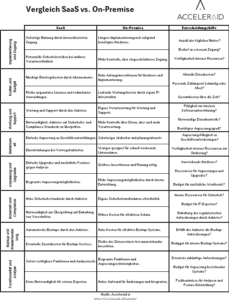
Screenshot Excel OnPremise vs SaaS
We offer different solution paths, both as SaaS and as on-premise, depending entirely on your system landscape, contact us today!
Read on
Where to go next.
From the blog

CLM & CVM
The AI Decision Engine Business Case: What Banks Can Calculate Before Go-Live

CLM & CVM
Next Best Action in Banking: Ten Use Cases with Trigger, Check Rule and Success Measure

CLM & CVM